Payment Settings
Configure payment window, confirmations, price markup, and other payment behavior settings.
AshePay gives you control over how payments behave — how long a customer has to pay, how strict the amount matching is, and how much buffer to add for price volatility. This page explains each setting. All payment settings are in AshePay → Settings → Payment.
Payment window (expiry time)
This is how long a customer has to send the payment after placing an order. The default is 15 minutes. You can set it anywhere from 5 to 60 minutes.
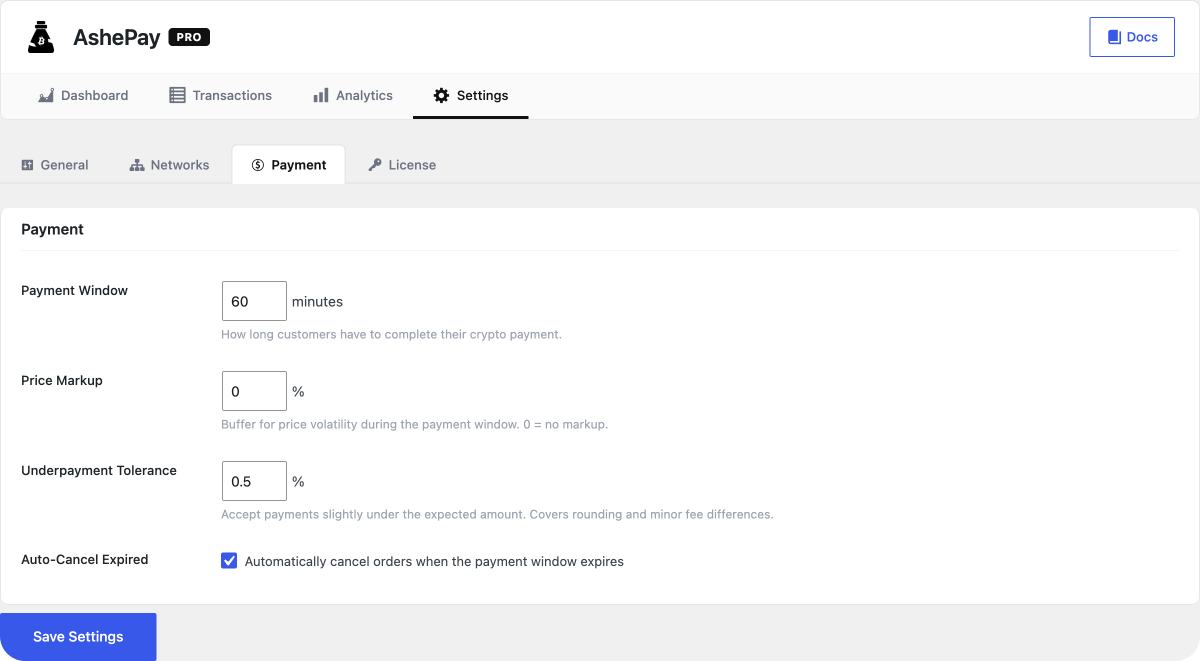
Shorter window = lower price slippage risk. Longer window = more time for slower customers. For Bitcoin, consider setting 60 minutes since Bitcoin confirmations take longer. For Ethereum, 15–30 minutes is plenty.
If the customer does not pay before the window closes, the order is cancelled automatically. The customer can place a new order — a fresh exchange rate will be used.
Required confirmations
This controls how many on-chain confirmations AshePay waits for before marking the order as paid. More confirmations = more security against rare chain reorganizations, but slower confirmation for your customer.
Default values:
- Ethereum — 12 confirmations (~3 minutes)
- Bitcoin — 3 confirmations (~30 minutes)
On Pro, additional chains have their own defaults. You can adjust these per-chain in AshePay → Settings → Networks under the Advanced section for each chain.
Price markup buffer
Crypto prices move while the customer is completing checkout. The markup buffer adds a small percentage to the calculated crypto amount to protect against price dropping between when the invoice is created and when the customer pays.
For example, with a 1.5% markup:
- Order total:
- Live ETH price: ,000
- Amount requested: 0.03383 ETH (≈ .50 at current price)
If ETH drops 1% during the payment window, you still receive close to the full order value. The default is 0% (no markup). Most stores set 1–2%.
Underpayment tolerance
Small rounding differences can occur when customers manually type an amount instead of using the copy button. Payments within ±0.5% of the expected amount are automatically accepted. This is not configurable but is designed to handle real-world precision limitations.
Larger underpayments are flagged in your transaction dashboard and the order stays on-hold for your manual review.
Payment page gateway title & description
You can customize the text shown in the WooCommerce checkout alongside the AshePay payment option. The default title is "Pay with Crypto" and the description is a short explanation of what happens next. These settings are in AshePay → Settings → General.