

Payment processors charge a percentage of every transaction you make. Stripe takes 2.9% plus $0.30. PayPal goes up to 3.49%. On a $10,000/month store, that is between $290 and $350 disappearing before a single business expense is paid. Across a year: over $3,500 gone on fees alone.
Crypto payments have been positioned as the fix for years. The real problem is that most crypto payment gateways for WooCommerce simply replace one intermediary with another. Funds still route through a hosted platform, a cut is still taken, and you are still dependent on a third party staying online and not freezing your account.
This review covers what a self-custodial crypto payment gateway for WooCommerce actually means, how AshePay works, and how it compares to Coinbase Commerce, BitPay, and NOWPayments across the criteria that actually matter to store owners.
Most WooCommerce store owners looking at crypto payments ask the same questions: Does the plugin hold my funds at any point? What fees does it charge? What happens if the company shuts down? What coins can customers actually pay with? The answers vary significantly between options, and they matter more than most comparison articles acknowledge.
The sections below cover each of these questions across all four options. The goal is a practical picture of what each gateway delivers, not just a feature table.
Self-Custodial vs Custodial Crypto Payments: The Difference That Matters
When you accept a Stripe payment, Stripe processes it. Money moves from the customer's card to Stripe's system, Stripe deducts its fee, and Stripe deposits the remainder into your bank account. At every stage, Stripe controls the funds. They can reverse transactions, freeze accounts, or impose holds with minimal notice.
Custodial crypto payment gateways work the same way, just with crypto instead of cards. The customer sends crypto to the gateway's wallet. The gateway then forwards funds to you, minus a fee. If the gateway has a compliance issue, restricts accounts in your country, or goes offline, your payment flow is affected.
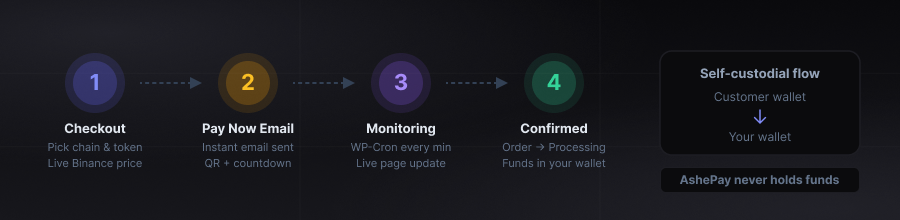
Self-custodial means the customer sends payment directly to your wallet address on the blockchain. No intermediary wallet involved. The transaction goes directly from the customer's wallet to yours, confirmed by the blockchain network. The plugin monitors the blockchain to detect when this happens and updates your WooCommerce order status automatically. It never has access to your funds at any point.
Why the Architecture Difference Matters Practically
- No account to freeze Funds go directly to your wallet. There is no platform account that can be suspended or restricted.
- No chargebacks Blockchain transactions are final once confirmed. No dispute mechanism exists at the protocol level for completed payments.
- No custodial risk If the plugin company stops operating tomorrow, every payment already received is already in your wallet. Nothing is held anywhere else.
- No customer KYC Customers pay from their own wallets. No account creation or identity verification is required on their end.
- No geographic restrictions Self-custodial payments work the same for customers in any country. No region-based account restrictions apply.
The one real trade-off: refunds require manual action. If you need to return a crypto payment, you send it from your wallet. There is no automatic reversal button. This is a minor operational difference, not a technical limitation, and it applies to all crypto gateways to varying degrees.
How AshePay Works: The Payment Flow
AshePay integrates as a standard WooCommerce payment gateway. After installation, it appears at checkout alongside your other payment options. The customer selects it, chooses a blockchain and token, and is shown a payment page with a QR code, wallet address, exact crypto amount, and a countdown timer.
The plugin calculates the crypto amount from live Binance spot prices, with CoinGecko as an automatic fallback. A configurable markup buffer accounts for price movement between quote and confirmation. A small unique decimal offset distinguishes simultaneous orders on the same address.
Customer Selects the Gateway at Checkout
They pick their preferred blockchain and token. The exact crypto amount is calculated in real time from live prices and displayed immediately.
Pay Now Email Fires Immediately
An email lands with a large Pay Now button at the top. One tap opens the payment page: QR code, wallet address, exact amount, and countdown. Works on any device without app installation.
Blockchain Monitoring in Real Time
The plugin polls the blockchain every minute. The payment page updates in real time, no refresh required. Customers can watch confirmation progress live. Pro users can replace WP-Cron with Action Scheduler for more reliable background processing, independent of page visit frequency.
Automatic Order Fulfillment
Once the required on-chain confirmations are reached, the WooCommerce order moves to Processing automatically. The customer receives a confirmation email. No manual review needed.
AshePay vs Coinbase Commerce vs BitPay vs NOWPayments
The four most commonly compared WooCommerce crypto payment options have meaningfully different architectures and cost structures. Here is how they line up on the criteria that matter most:
| Feature | AshePay Ours | Coinbase Commerce | BitPay | NOWPayments |
|---|---|---|---|---|
| Custodial model | Self-custodial | Custodial | Custodial | Custodial |
| Platform fees | 0% | ~1% | 1% | 0.5% |
| Free plan | Yes, no expiry | Yes | No | Yes |
| Exchange account required | No | Yes (Coinbase) | Yes + KYC | Yes (API key) |
| Supported blockchains | 8 | 6 | 2 | 10+ |
| Native WooCommerce checkout | Yes | Partial | Off-site redirect | Partial |
| Funds held by third party | Never | Yes | Yes | Until withdrawal |
| Partial payment support | Yes (Pro) | No | No | No |
| Built-in analytics | Yes (Pro) | No | No | No |
The core difference is the custodial model. AshePay is the only option in this comparison where funds never pass through a third-party wallet. Every other gateway holds your money at some point in the settlement process.
AshePay Strengths
- Zero platform fees, ever
- Funds go directly to your wallet, nothing intermediated
- No exchange account or KYC required to operate
- No third-party platform dependency for ongoing payments
- Native WooCommerce checkout, no external redirects
- Free tier is fully functional with no expiry
- Works on standard WordPress hosting, no custom server needed
Limitations to Know
- Refunds require manual wallet action
- Free tier limited to one blockchain
- Bitcoin confirmations take 30 to 60 minutes by design
- WooCommerce-only, not available for other platforms
BitPay's fiat conversion model is the most different from the others. If the goal is holding crypto rather than just receiving and converting it, BitPay defeats that purpose entirely. Coinbase Commerce is workable if you already have an established Coinbase business account, but your payment flow is contingent on that account remaining in good standing. NOWPayments makes sense if you genuinely need exotic coin support, but 0.5% on volume adds up quickly.
For most WooCommerce stores that want lower costs, faster international settlement, and no platform account dependency, the self-custodial model is the starting point to evaluate. You can also read our step-by-step WooCommerce crypto setup guide for the full configuration walkthrough.
Supported Blockchains and Tokens
As of 2026, the plugin supports 8 blockchains. Each has multiple token options, giving customers a choice between native coins and stablecoins.
For customers who are fee-sensitive or want fast confirmations, Polygon, BNB Chain, Arbitrum, Base, and Solana are the practical choices. Gas fees on these chains are fractions of a cent, and confirmations take seconds to under a minute. Ethereum and Bitcoin have higher gas costs and slower confirmation times, but they are the most widely held assets and worth enabling for customers who specifically want to pay in them.
Stablecoin acceptance deserves separate mention. USDT and USDC payments remove the volatility question for both parties. The customer pays a dollar-pegged amount from their wallet. You receive that dollar-pegged amount in your wallet. No conversion step, no price risk during the confirmation window. For stores new to crypto, starting with USDT on Polygon or BNB Chain covers the most practical use case with minimal friction.
AshePay Pro: Advanced Features for Growing Stores
The free version covers everything needed to start accepting crypto. AshePay Pro adds features built for stores with higher volume and more complex requirements.
What AshePay Pro Adds
- Analytics Dashboard — A full transaction analytics panel inside WordPress admin. Track revenue by network, token, and time period. See volume trends, top chains, and payment data without exporting to any third-party tool.
- Partial Payment Support — Automatically accept orders where the customer sends slightly less than required, within a configurable tolerance. Useful for wallets that deduct gas from the sent amount, or for stores that prefer to recover borderline payments rather than cancel them.
- Action Scheduler Integration — Replaces WP-Cron with Action Scheduler for background blockchain monitoring. Runs independently of page visits, so payment detection stays reliable even on low-traffic stores where WP-Cron fires irregularly.
- All 8 blockchains unlocked — The free tier supports one blockchain. Pro unlocks all eight simultaneously, including Solana, Tron, Base, Arbitrum, and more.
Pricing is $69/year per site (regular $89), or $199 for a lifetime license (regular $276). No transaction fees on top of either plan. A store processing $50,000/year in crypto keeps the full amount minus blockchain gas.
Is AshePay the Right Choice?
If your goal is accepting crypto payments without routing funds through a third party, without platform fees, and without creating an account on an exchange, AshePay is the most direct option for WooCommerce. The free tier is genuinely functional for single-chain setups. Pro is the right upgrade once you want multi-chain coverage, volume analytics, or more reliable payment monitoring.
The alternatives — Coinbase Commerce, BitPay, NOWPayments — all make sense in specific contexts. But if self-custody and zero platform fees are the criteria, none of them deliver that by design. AshePay is built around that model from the ground up.
Get started with AshePay
Zero platform fees, self-custodial, 8 blockchains. Install the free version with no expiry, or go Pro for stablecoins, analytics, and all chains unlocked.
Get AshePay Pro — $69/year or $199 lifetime →Ashe Labs
We build high-performance websites, modern web applications, and Web3 experiences. From custom development to smart digital solutions, we turn ideas into products.