

Stripe keeps 2.9% of every sale. PayPal takes 3.49%. On a $10,000/month store, that's $300-$350 gone before you've paid for anything else. Crypto payments change that equation completely - zero platform fees, no chargebacks, and funds land directly in your wallet the moment a transaction confirms.
This guide covers everything you need to set up a fully working crypto checkout on WooCommerce in 2026 using AshePay - a self-custodial WordPress plugin that supports 8 blockchains out of the box.
Why Add Crypto Payments to Your WooCommerce Store?
Crypto isn't a niche payment method anymore. Hundreds of millions of people globally hold and spend crypto daily - and many prefer it over cards. If your store doesn't accept crypto, you're invisible to that audience.
But the real case for adding crypto payments isn't just about reaching new customers. It's about what you stop losing:
The Real Cost of Traditional Payment Processors
- Stripe fees - 2.9% + $0.30 per transaction. On $10,000/month that's $290+ every month, $3,480+ per year.
- Chargebacks - A customer claims they didn't receive an order. The money is reversed, you pay a dispute fee, and your chargeback ratio climbs. Too many and your processor account gets terminated.
- Account freezes - Stripe and PayPal can freeze accounts with little notice. Your money is locked, sometimes for 90-180 days.
- Geographic restrictions - Millions of potential customers have limited or no access to international banking. Crypto removes that barrier entirely.
- Currency conversion - Cross-border card payments lose 1-3% to conversion fees at multiple points in the chain.
Crypto payments solve all of these. Transactions are final, fees go to miners (not processors), and there's no intermediary who can freeze your funds. Your wallet, your money, your control.
What Is AshePay?
AshePay is a WordPress plugin that adds a native crypto payment gateway to WooCommerce. Unlike third-party crypto processors (Coinbase Commerce, BitPay), AshePay is fully self-custodial - payments go directly from the customer's wallet to your wallet on the blockchain. The plugin only monitors transactions; it never holds, routes, or touches your funds.
Your Funds, Your Control - Always
- Wallet-to-wallet payments - Every transaction goes directly from the customer's wallet to yours on-chain. Ashe Labs is never in the payment path. There is no platform wallet, no settlement batch, no holding period.
- Ashe Labs holds zero funds - The plugin reads blockchain data to detect incoming payments. That's all it does. Your wallet balance and your keys are yours alone.
- No platform dependency - If Ashe Labs shut down tomorrow, every payment you've already received stays in your wallet. Future payments would stop being auto-detected, but nothing already confirmed is ever at risk.
- No account to freeze - There is no AshePay account for your funds to sit in. Nothing can be suspended, restricted, or withheld.
Zero Platform Fees
No percentage, no per-transaction cut, no monthly minimums. You pay network gas fees (fractions of a cent on most chains) - that's it. The free version supports Ethereum and Bitcoin with no expiry.
100% Self-Custodial
Your wallet address is in your plugin settings. Payments land there directly. AshePay has no access to your funds - ever.
Live Binance Pricing
Crypto amounts are calculated in real time using Binance spot prices. CoinGecko kicks in automatically if Binance is unavailable. No API key required for either.
Automatic Order Fulfillment
Once the required confirmations are reached on-chain, the WooCommerce order moves to "Processing" automatically. No manual review, no delays.
Supported Blockchains & Tokens
The free version includes Ethereum (ETH) and Bitcoin (BTC) with no expiry. AshePay Pro activates all 8 blockchains simultaneously so your customers can pay on whichever network they prefer.
Tokens Supported Per Chain
- Ethereum, Arbitrum, Base - ETH (native), USDT (ERC-20), USDC (ERC-20)
- Polygon - POL (native), USDT, USDC
- BNB Chain - BNB (native), USDT (BEP-20), USDC (BEP-20)
- Solana - SOL (native), USDT (SPL), USDC (SPL)
- Bitcoin - BTC (native)
- Tron - TRX (native), USDT (TRC-20)
Which blockchain should I start with?
For lowest fees and fastest confirmations, start with Polygon, BNB Chain, or Arbitrum - gas fees are fractions of a cent and confirmations take seconds. Ethereum is the most widely held but has higher gas. Bitcoin is the most trusted but slowest (30-60 min for full confirmation). USDT/USDC on any chain is ideal if you want stable fiat-equivalent payments.
How to Set Up AshePay on WooCommerce - Step by Step
The full setup takes under 5 minutes. You need an active WooCommerce store and a crypto wallet address for at least one chain.
Install the Plugin
Search AshePay in the WordPress plugin directory (Plugins - Add New), or download it from Ashe Labs for the Pro version. Install and activate. No configuration is needed to activate - it integrates automatically with WooCommerce.
Paste Your Wallet Address
Go to WooCommerce - Settings - Payments - AshePay. Enable the gateway and paste your wallet address for each chain you want to accept. Any standard wallet works: MetaMask, Phantom, Trust Wallet, or a hardware wallet like Ledger or Trezor. Multi-wallet rotation is supported - add multiple addresses per chain and AshePay rotates between them automatically.
Select Your Chains & Tokens
Enable the blockchains you want to accept. For each chain, choose which tokens to offer at checkout - native coin, USDT, USDC, or all three. The free version includes Ethereum (ETH) and Bitcoin (BTC); AshePay Pro activates all 8 chains simultaneously with stablecoins.
Configure Payment Settings
Set your price markup buffer (e.g. 1-2%) to protect against crypto volatility between quote and payment. Set the payment expiry window (default: 60 minutes). Adjust required confirmation counts per chain if needed. Everything else works out of the box - no RPC node, no API key, no server-side cron setup required.
Go Live & Test
Place a test order using AshePay as the payment method. You'll receive the Pay Now -> email immediately with the payment page link. Send a real micro-transaction to verify detection works. Once confirmed on-chain, the order moves to "Processing" automatically. Your WordPress admin bar will show a live badge with the count of pending crypto payments.
If you need help with any step, the AshePay documentation covers every setting in detail - from wallet configuration and RPC endpoints to underpayment tolerance and confirmation thresholds. Everything is documented and searchable so you are never left guessing.
What Happens When a Customer Pays
Understanding the payment flow helps you support customers and troubleshoot edge cases:
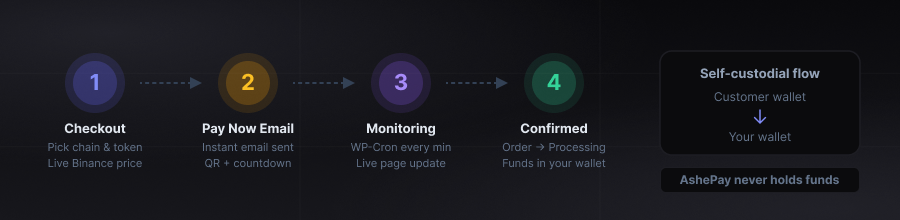 The full AshePay payment flow - from checkout to confirmed WooCommerce order.
The AshePay Payment Flow
- Step 1 - Checkout - Customer selects AshePay at checkout, picks their preferred blockchain and token. The exact crypto amount is calculated from live Binance prices with a tiny unique decimal offset to distinguish concurrent orders.
- Step 2 - Pay Now email - An email fires instantly with a large Pay Now -> button at the top. One tap opens the payment page: QR code, wallet address, exact amount, and countdown timer.
- Step 3 - Blockchain monitoring - AshePay polls the blockchain every minute. The payment page updates live - no refresh needed. Customers can watch confirmation progress in real time. Pro users can switch from WP-Cron to Action Scheduler for more reliable background processing on any hosting setup.
- Step 4 - Auto-fulfillment - Once the required on-chain confirmations are reached, the WooCommerce order moves to Processing automatically. A confirmation email goes to the customer. No manual action needed.
Free vs Pro: What You Get
The free version is not a trial. It has no expiry. The only difference from Pro is the number of active blockchains and the absence of stablecoins and analytics.
AshePay Free
- Ethereum (ETH) and Bitcoin (BTC) - no expiry
- Full payment flow - QR code, Pay Now email, auto-fulfillment
- Multi-wallet address rotation
- Underpayment tolerance (0.5%)
- Admin bar pending payment badge
- HPOS compatible, Block Checkout ready
AshePay Pro ($69/year)
- All 8 blockchains active simultaneously
- Stablecoins - USDT and USDC on all supported chains
- Analytics dashboard - revenue charts, token breakdown
- CSV transaction export for accounting
- White-label checkout - remove AshePay branding
- Priority email support
At Stripe's 2.9%, a single $2,380 sale saves $69 in processing fees. For any store with consistent volume, Pro pays for itself within the first days of going live.
Why Upgrade to Pro?
The free version handles real payments permanently with no expiry. Pro is the right move when any of these apply:
Upgrade When You Need:
- Stablecoin acceptance — USDT and USDC on every chain. The single biggest reason customers upgrade. Stablecoins eliminate volatility entirely and are the most-used crypto payment method globally.
- Low-fee chains — Polygon, BNB Chain, Arbitrum, Base, and Solana have sub-cent gas fees and sub-minute confirmations. These are locked behind Pro. Ethereum and Bitcoin (free) have higher costs and slower speeds.
- Analytics dashboard — See your crypto revenue by network, token, and time period directly in WordPress admin. No spreadsheets, no exports.
- Reliable monitoring on shared hosting — WP-Cron depends on site traffic to fire. Action Scheduler (Pro) runs independently, so payment detection stays consistent even on low-traffic stores.
- Partial payment handling — Configurable tolerance for underpayments so borderline orders complete instead of staying on-hold.
Frequently Asked Questions
Do I need a crypto exchange account to use AshePay?
No. You only need a wallet receive address for each chain you want to activate. Any non-custodial wallet works - MetaMask, Trust Wallet, Phantom, Ledger, Trezor. No Coinbase account, no KYC, no API key from any third-party service.
Does Ashe Labs ever hold or touch my funds?
Never. AshePay is fully self-custodial - the plugin reads blockchain data to detect incoming payments and updates your WooCommerce order status. That is all it does. Every payment goes directly from the customer's wallet to your wallet address on-chain. Ashe Labs has no access to your wallet, your keys, or your funds at any point.
What happens if a customer sends the wrong amount?
Payments within 0.5% of the expected amount are automatically accepted - this covers rounding differences. Larger underpayments are flagged and the order stays on-hold for manual review. Overpayments are accepted and noted in the order notes. You handle any refund manually from your wallet.
How do refunds work with crypto payments?
Refunds are manual - you send the crypto from your wallet directly to the customer's address. There is no automatic reversal mechanism at the blockchain level. This applies to all crypto payment methods, not just AshePay. For digital products where chargebacks are a concern, this is actually an advantage - payments are final once confirmed.
Does AshePay work with the WooCommerce Blocks checkout?
Yes. AshePay is fully compatible with the WooCommerce Blocks-based checkout and HPOS (High-Performance Order Storage). It works with any theme or page builder that supports WooCommerce.
What if the crypto price moves between when the order is placed and when the customer pays?
The configurable markup buffer (recommended 1-2%) protects against short-term price movement. The payment window countdown (default 60 minutes, adjustable down to 5) limits exposure. For maximum price stability, accepting USDT or USDC eliminates volatility entirely since both are dollar-pegged stablecoins.
Ready to add crypto payments to your store?
Install the free version from the WordPress plugin directory — no expiry, no credit card needed. Upgrade to Pro when you need stablecoins, more chains, or analytics.
Get AshePay Pro — $69/year or $199 lifetime →Ashe Labs
We build high-performance websites, modern web applications, and Web3 experiences. From custom development to smart digital solutions, we turn ideas into products.