
AshePay Pro - Crypto Payment Gateway for WooCommerce
★★★★★5.0 · 2 reviewsAccept Bitcoin, Ethereum, Polygon, Solana, BNB Chain, Arbitrum, Base and Tron directly in WooCommerce. Zero platform fees. Zero KYC. Payments go straight from your customer's wallet to yours - with live market pricing, real-time blockchain monitoring, and a pending payment badge in your WordPress toolbar.
Choose your plan
SKU: ASHEPAY-PRO
Tags
About This Product
AshePay is a self-custodial crypto payment gateway for WordPress and WooCommerce. Payments go directly from the buyer's wallet to your wallet - no third-party processor, no custody risk, no platform fee ever. Accept Bitcoin and Ethereum free, forever. Unlock all 8 blockchains simultaneously with Pro.
Why Store Owners Choose AshePay
- Your funds, your control - Payments land in your wallet the moment they confirm on-chain. No middleman, no frozen funds, no settlement delay.
- Zero platform fees - forever - Stripe takes 2.9%. PayPal takes 3.49%. AshePay takes 0%. On $10,000/month that's $290-$349 saved every month.
- No chargebacks - Blockchain transactions are final. Once confirmed, the payment is permanently yours. No dispute process, no reversal risk.
- No KYC for your customers - Customer picks a token, pays. No account, no forms, no ID. Checkout in under 60 seconds.
- Live market pricing - Crypto amounts calculated in real time via ashelabs.io price proxy, using Binance spot data with automatic CoinGecko fallback. No API key or account needed.
Key Features
Zero Fees, Direct to Your Wallet
No percentage cut, no processing delay. The moment a transaction confirms on-chain, the funds are in your wallet - not held by an intermediary. Only blockchain gas applies, which is negligible on most modern chains.
QR Code Checkout
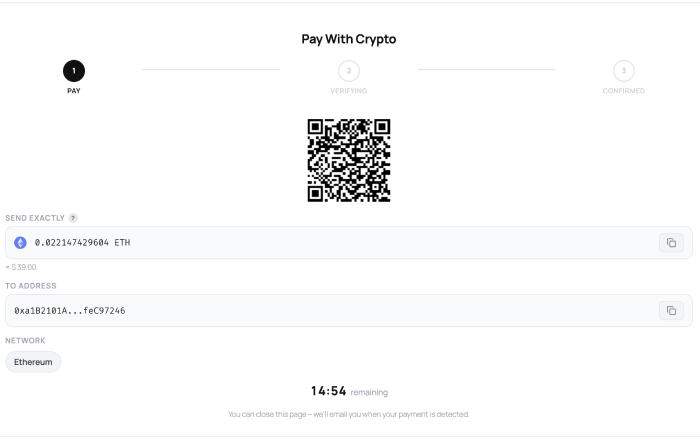
Clean QR code with one-click address copy, generated locally in the browser with no external service. Works with MetaMask, Trust Wallet, Phantom, and every mobile wallet. Configurable countdown timer keeps the session live.
Partial Payment Support
Customers can complete an order across multiple transactions. Each partial payment is confirmed on-chain individually and shown with its own explorer link. A live "received / still needed" display updates in real time as each transaction arrives - no page refresh needed.
Live Market Prices
Real-time crypto amounts via ashelabs.io price proxy, sourced from Binance spot data with CoinGecko as automatic fallback. No API key, no account, no monthly fees. A configurable markup buffer protects against price movement between quote and confirmation.
Multi-Wallet Rotation
Add multiple wallet addresses per chain. AshePay automatically picks a free address for each new order, preventing address reuse and payment confusion. Best practice for privacy and higher-volume stores.
Admin Bar Badge
Live pending payment counter in your WordPress toolbar. The badge updates in real time as payments arrive and clears when orders are fulfilled. Never miss an incoming transaction.
Custom RPC Endpoints
Ships with reliable public endpoints - no setup required. Replace them with your own Infura, Alchemy, or QuickNode endpoint for enterprise-grade reliability and higher rate limits.
Analytics Dashboard
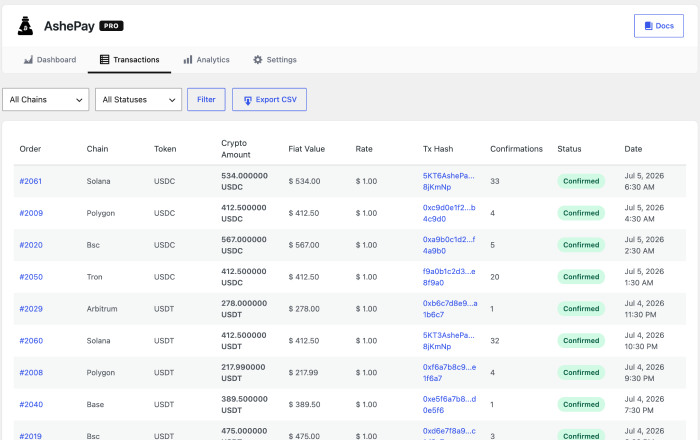
See your total crypto revenue at a glance. Break it down by token and chain, track daily volume over time, and spot your best-performing payment methods. One click exports the full transaction history to CSV for your accountant.
How It Works
Customer Reaches the Payment Page
With Pro, the customer picks their preferred blockchain and token at checkout - ETH, SOL, BTC, BNB, and more. With the free version, the payment goes straight to your configured chain (Ethereum or Bitcoin). The exact crypto amount is calculated instantly using live market prices, with a small unique decimal offset so concurrent payments are always matched to the right order.
Instant "Pay Now" Email
The moment the order is placed, AshePay sends a payment instructions email with a large Pay Now → button at the top. One tap opens the payment page: QR code, wallet address, exact amount, and countdown timer - no hunting through email for a link.
Automatic Blockchain Monitoring
AshePay uses Action Scheduler (WooCommerce's built-in job queue) to scan the blockchain every minute. When a matching transaction is detected, the payment page updates live - no refresh needed. Your admin bar badge drops and a confirmation email goes to the customer automatically.
Order Completes Automatically
Once the required on-chain confirmations are reached, the WooCommerce order moves to "Processing." Your customer gets a confirmation email, and the funds are already in your wallet. Zero manual steps.
Supported Blockchains & Tokens
The free version supports Ethereum and Bitcoin with native tokens only (ETH and BTC). AshePay Pro activates all 8 chains simultaneously with all their tokens:
Tokens Supported Per Chain
- Ethereum, Arbitrum, Base - ETH (native), USDT (ERC-20), USDC (ERC-20)
- Polygon - POL (native), USDT, USDC
- BNB Chain - BNB (native), USDT (BEP-20), USDC (BEP-20)
- Solana - SOL (native), USDT (SPL), USDC (SPL)
- Tron - TRX (native), USDT (TRC-20)
- Bitcoin - BTC (native)
All tokens above require AshePay Pro. The free version supports Ethereum (ETH only) and Bitcoin (BTC only). Pre-configured tokens only - no custom tokens. For stores new to crypto, starting with USDT on Polygon or BNB Chain (Pro) covers the most practical use case: near-instant confirmations and sub-cent gas fees.
AshePay vs the Competition
Every WooCommerce crypto gateway looks similar on the surface. The architecture difference - custodial vs self-custodial - changes everything about who controls your money and what fees you pay:
| Feature | AshePay Ours | Coinbase Commerce | BitPay | NOWPayments |
|---|---|---|---|---|
| Custodial model | Self-custodial | Custodial | Custodial | Custodial |
| Platform fee per transaction | 0% | ~1% | 1% | 0.5% |
| Permanent free plan | Yes, no expiry | Yes | No | Yes |
| Merchant account required | No | Yes (Coinbase) | Yes + KYC | Yes + API key |
| Merchant KYC / verification | None | Required | Required | Partial |
| Supported blockchains | 8 | 6 | 2 | 10+ |
| Native WooCommerce checkout | Yes, native | Partial | Off-site redirect | Partial |
| Funds held by third party | Never | Yes | Yes (converts to fiat) | Until withdrawal |
The core difference is custody.
AshePay is the only option in this comparison where payments go directly from the customer's wallet to your wallet. No third party ever holds, routes, or settles your funds. Coinbase Commerce, BitPay, and NOWPayments all custody your money at some point in the settlement process.
Perfect For
- Stores with international customers who hold crypto
- Digital products where chargeback risk is high
- High average order values where percentage fees hurt
- Crypto-adjacent businesses (NFTs, Web3, blockchain tools)
- Privacy-conscious customer bases
- Merchants who want to hold crypto, not auto-convert to fiat
What You Need to Get Started
- WordPress 5.8+ with WooCommerce installed and active
- PHP 7.4 or higher (8.x recommended)
- HTTPS on your site (required by browser wallets)
- A wallet address per chain (MetaMask, Phantom, Ledger, etc.)
- WooCommerce 6.0+ with Action Scheduler (built-in - no server cron configuration needed)
Free vs. Pro
The free version has no expiry and no trial - it's a permanent, fully working crypto payment gateway for Ethereum and Bitcoin. Pro unlocks all 8 chains with all their tokens simultaneously:
AshePay Free
Fully functional - forever free
- Ethereum and Bitcoin supported
- Native tokens only (ETH and BTC)
- QR code payment page + countdown timer
- Pay Now → email with expiry time
- Real-time blockchain monitoring (every minute)
- Partial payment support - customers can split an order across multiple transactions
- Automatic order fulfillment
- Full transaction history
- Admin bar badge - live pending count
- Multi-wallet rotation per chain
- Smart underpayment tolerance (±0.5%)
- Price markup buffer (volatility protection)
- Custom RPC endpoint support
- Live crypto price shortcode
- Health notices + cron alerts
- WooCommerce Blocks & HPOS compatible
- Zero platform fees - forever
AshePay Pro
All chains. All features. One license.
- Everything in Free, plus:
- All 8 blockchains simultaneously
- Stablecoins on every chain (USDT & USDC, where available)
- Analytics dashboard - revenue charts, token breakdown, daily volume
- CSV export for accounting & reconciliation
- Priority email support
- 1 active site license
- 1 year of updates & new chain support
Why AshePay Pays For Itself
Eliminate Payment Processor Fees
Stripe charges 2.9% + $0.30. PayPal charges 3.49%. On $10,000/month that's $290-$349 gone. AshePay charges 0%. At $49/year, AshePay Pro pays for itself in a single transaction.
Accept Global Payments
Crypto is borderless. A customer with restricted banking access pays just as easily as someone next door - no SWIFT fees, no declined foreign cards, no currency conversion losses.
Zero Chargeback Risk
Blockchain transactions are irreversible. No fraudulent chargebacks, no dispute fees, no chargeback ratio threatening your processor account. Payment finality is guaranteed by the blockchain.
Reach Crypto-Native Customers
Hundreds of millions of people globally prefer paying with crypto. Add AshePay and reach customers your competitors can't - with a checkout experience those customers already use every day.
Start accepting crypto today - free, forever.
Install AshePay Free from the WordPress plugin directory in under 5 minutes. No account, no KYC, no fees. Pro unlocks all 8 chains for $49/year.
Download Free on WordPress.org →Frequently Asked Questions
Do I need a crypto wallet to use AshePay?
Yes - you need a wallet receive address for each chain you want to accept. Any standard wallet works: MetaMask, Phantom, Trust Wallet, or a hardware wallet (Ledger, Trezor). Just paste the address into the plugin settings. No exchange account or business verification required.
Does AshePay hold my funds at any point?
No. Payments go directly from the customer's wallet to your wallet on the blockchain. AshePay only monitors the blockchain to detect incoming transactions - it never touches, routes, or holds your funds. The plugin has no access to your wallet private keys.
How long does payment detection take?
It depends on the blockchain. Fast chains - Solana, Polygon, BNB Chain, Base, Tron, and Arbitrum - confirm in seconds to under a minute. Ethereum typically takes 1-2 minutes. Bitcoin is the slowest: expect around 30-60 minutes for 3 confirmations. You can adjust the required confirmation count per chain in the settings.
What if the customer sends the wrong amount?
Payments within ±0.5% of the expected amount are automatically accepted. Larger underpayments are flagged as "underpaid" for manual review - or the customer can send the remaining amount as a second transaction and AshePay will combine them automatically. Overpayments complete normally - you keep the full amount received.
What happens with crypto price volatility?
The crypto amount is calculated from live market prices (via ashelabs.io price proxy using Binance data) at the moment the customer initiates payment. A configurable markup buffer (typically 1-2%) protects against price movement during the confirmation window. For stablecoin payments (USDT, USDC), volatility is not a factor - both are dollar-pegged. Most new stores start with USDT on Polygon or BNB Chain to eliminate this concern entirely.
Do I need to configure a cron job on my server?
No. AshePay uses Action Scheduler, WooCommerce's built-in job queue - no server cron configuration needed. Action Scheduler is included with WooCommerce and runs automatically. If Action Scheduler is unavailable for any reason, AshePay falls back to WP-Cron automatically.
Will it work with my theme and page builder?
Yes. AshePay is a native WooCommerce payment gateway - it doesn't modify your theme or override template files. Compatible with Elementor, Divi, Bricks, Kadence, Astra, Flatsome, and virtually every other theme and page builder.
Can I use it on multiple sites?
The Pro license covers 1 active installation. Need more sites? Contact us - multi-site licenses are available. The free version has no activation limits.
Compatibility
System Requirements
- WordPress 5.8 or higher
- WooCommerce 6.0 or higher
- PHP 7.4 or higher
- Action Scheduler enabled via WooCommerce (payment monitoring runs every minute - no server configuration needed)
- Outbound HTTPS to ashelabs.io (price proxy) and blockchain RPC endpoints

Release Notes
Changelog
Version 1.23.3
July 14, 2026Latest- AddedContract address tooltip on the "Select a token" header — lists all non-native token contracts for the active chain
- AddedToken contract address appended to the "Send Exactly" ? tooltip on the payment page
- ImprovedMobile checkout layout and touch interactions verified on real devices via ngrok tunnel
- FixedCSS specificity issue causing the contract address tooltip to render inline instead of on separate lines
- FixedTooltip line-break rendering now uses real <br> elements instead of relying on white-space: pre-line
Version 1.20.0
June 15, 2026- AddedThree-step progress bar on the payment page: PAY, VERIFYING, CONFIRMED
- AddedNetwork badge showing the selected chain on the payment confirmation page
- ImprovedQR code container sizing and alignment on mobile
- ImprovedWallet address displayed truncated with hover tooltip to reveal full address (same pattern as receiver address)
- ImprovedOrder status polling reliability — reduced false positives on slow nodes
- FixedPayment page layout breaking on narrow screens when the token symbol was long
Version 1.17.0
May 20, 2026- AddedArbitrum, Base, Optimism, Avalanche (AVAX), Fantom (FTM) chain support
- AddedSolana (SOL) and Solana-based SPL tokens
- AddedBitcoin (BTC) support via native address detection
- AddedReal-time crypto price estimate shown in the WooCommerce order summary sidebar
- ImprovedToken icon fallback — uses chain icon when token-specific icon is not available
- ImprovedExchange rate cache to avoid redundant API calls during checkout
Version 1.14.0
May 1, 2026- AddedFull WooCommerce Blocks checkout support — registered as a Blocks payment method via wc.wcBlocksRegistry
- AddedTwo-step selection UI in Blocks: network cards (step 1) then token cards (step 2)
- AddedLive exchange rate preview shown in the order summary during Blocks checkout
- Addedashepay_combo value (chain|TOKEN) passed via paymentMethodData to process_payment()
- ImprovedToken card selection with radio inputs and visual selected state
Version 1.10.0
April 10, 2026- AddedQR code generation on the payment page — encodes wallet address and amount in URI format
- AddedCountdown timer showing remaining time before the payment window expires
- AddedUnique payment fingerprinting — each order gets a tiny decimal offset so on-chain detection is unambiguous
- AddedFiat equivalent shown below the crypto amount (e.g. ≈ $39.00)
- AddedCopy button on both the amount and wallet address fields
Version 1.6.0
April 1, 2026- AddedVisual combo grid — each combination (chain + token) rendered as a clickable card with icon, symbol, and network name
- AddedChain and token icons loaded from the plugin assets folder
- AddedWallet address displayed truncated (0x1234...5678) with hover tooltip revealing the full address
- ImprovedCheckout layout rebuilt to be fully responsive on mobile
- ImprovedSelected card state with visual highlight and checkmark indicator
- FixedClassic shortcode checkout not applying correct payment method on form submit
Version 1.3.0
March 20, 2026- AddedBNB Smart Chain (BSC), Polygon (MATIC) and Tron (TRX) chain support
- AddedUSDT, USDC and DAI token support with configurable wallet addresses per chain
- AddedAdmin settings panel under WooCommerce → Settings → Payments → AshePay
- AddedPer-chain wallet address configuration in the admin panel
- ImprovedPayment detection logic to handle different block confirmation times per chain
Version 1.0.0
March 5, 2026- AddedWooCommerce payment gateway registered as "Pay with Crypto"
- AddedEthereum (ETH) and ERC-20 token payment support
- AddedClassic shortcode checkout integration
- AddedPayment page with wallet address and amount to send
- AddedOrder status automatically updated to processing on payment detection
- AddedAdmin toggle to enable/disable the gateway from WooCommerce settings
Customer Reviews
2 reviews
Finally, no middleman
Marcus
Jul 12, 2026
Been running a digital product store for 3 years. Stripe was eating $200+ a month in fees. Set up AshePay in about 20 minutes, configured my MetaMask address and that was it. First crypto payment came in the same day. Funds went straight to my wallet - no waiting, no withdrawal request. Exactly what I needed.
Verified PurchaseJohn
Apr 24, 2026